

The $913,000 Email — and the Five Days That Saved Most of It
The City of Pittsburg paid $913,839.81 to someone posing as a vendor it already knew, then got 76% of it back. How vendor impersonation actually works, why speed beat shame, and the three controls any small operation can copy this week.
The $913,000 email — and the five days that saved most of it
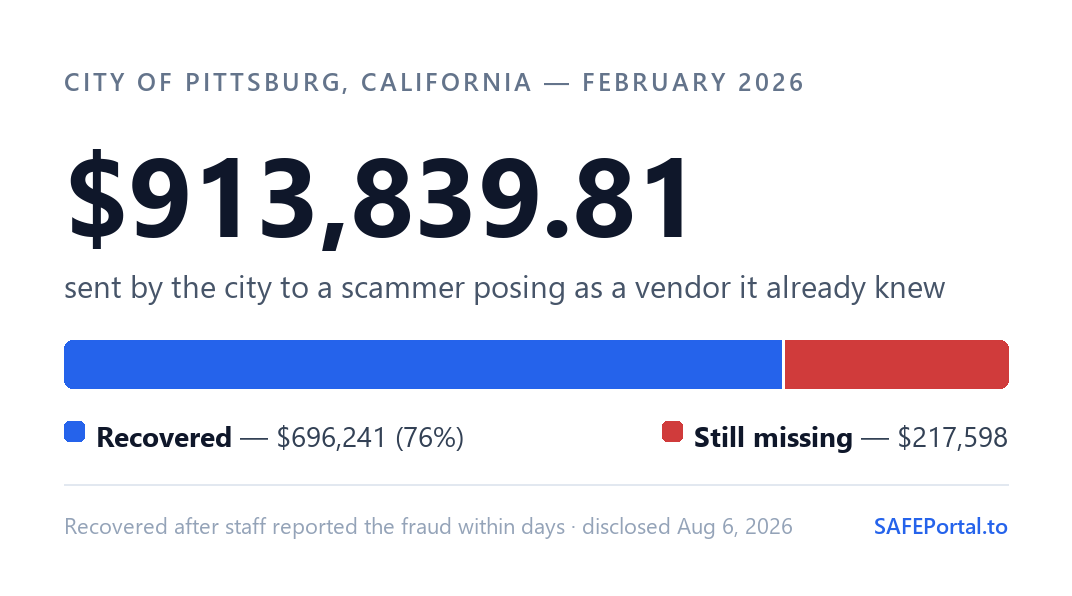
In February, the City of Pittsburg — about 40 minutes east of San Francisco — paid an invoice. The request came from what looked like a vendor the city already worked with, asking for a routine payment. Staff sent $913,839.81. The story went public this month: police say the account was a fake, run by a scammer based in Nigeria with at least two accomplices in the U.S.
Here's the number worth studying, though: the city got $696,241 of it back. Not because of any security product — because of what its staff did in the five days after the money left.
The con is familiarity, not sophistication
This scheme has a boring industry name — vendor impersonation, a flavor of business email compromise — and it follows the same script almost every time:
- Get into an inbox. Usually with a phishing link and a copied login page. Sometimes the compromised inbox isn't even yours — it's your vendor's.
- Read quietly. The scammer doesn't send anything for weeks. They learn which vendors bill you, for how much, on what schedule, in what tone, and who approves the payment.
- The switch. A message arrives that fits everything they learned. Same vendor name, plausible invoice, one change: the bank account. Sometimes it's a reply inside a real email thread. Sometimes it's a lookalike domain one letter off.
- The routine payment. Nobody feels anything unusual, because nothing unusual happened. The process worked exactly as designed — the design just never imagined the sender wasn't real.
- The hop. The money lands in a mule account and starts moving. Every hour it sits still is an hour it can be frozen.
This isn't a "city government" problem
Pittsburg made the news because public agencies have to disclose. The same play runs constantly against small businesses, HOAs, churches, school booster clubs, title companies — anyone who pays invoices. The FBI's internet crime reports put business email compromise losses in the billions every year, and the victims are overwhelmingly organizations too small to have a security team. A city has an IT department and a finance office, and this still worked. That's the point.
Why they got most of it back
Staff noticed the fraud five days after the payment and went straight to the Pittsburg police — who froze the receiving account and pulled in the FBI and the U.S. Attorney's Office. The investigation grew to 18 search warrants covering 116 bank accounts. Result: $696,241 recovered, with the remaining $217,598 now an insurance claim.
Banks and the FBI can often freeze and claw back a fraudulent transfer, but only inside a short window — days, sometimes hours. Most victims lose that window to embarrassment. They re-check quietly, hope it's a mistake, and don't want to be the one who fell for it. By the time anyone official hears about it, the money has hopped three accounts and left the country.
Speed beat shame here. That's the whole lesson.
Three controls worth copying this week
- Callback verification. Any change to a vendor's payment details is treated as fraud until confirmed by phone at a number you already had on file. No exceptions for urgency — urgency is part of the script.
- Two sets of eyes. New payees and banking changes require a second approver. One busy person is exactly what the scheme is built for.
- A same-day reporting playbook. If money goes out the door, everyone should know the drill: call the bank and ask for a recall and freeze, then file at ic3.gov — that day, not that week. Write it down now, while nobody's panicking.
Where SAFE Portal fits
Step one of the script — the phishing link that steals an email login — is the part SAFE Portal covers. Link screening flags lookalike domains before the page loads. The password manager checks the domain before it fills anything, so a pixel-perfect copy of your email login simply stays empty — and that silence is your alarm. Unique credentials for every account mean one stolen password doesn't hand over the rest of them.
What it won't do
SAFE Portal can't verify a vendor's bank details, approve an invoice, or claw back a payment. Payment verification is a phone call and a second signature, and no software replaces either one. What software can do is make the inbox harder to steal in the first place — and the rest of the playbook is on us. That's what this blog is for.
SAFE Portal is free to try and takes about two minutes to set up — no IT department required. Get it at SAFEPortal.to.