

The Fake Bank That Outranks the Real One
For months we've told you to skip the link in the email and go to the site yourself. New research shows the most common way people do that — searching for it — is now being poisoned, with fake bank logins ranking above the real ones and playing dead whenever anyone checks.
The fake bank that outranks the real one
Here is advice we have given in this newsletter three times: don't click the link in the email. Go to the site yourself.
It's still good advice. But research published this week complicates it, and the complication is worth understanding, because it lands on the exact habit most people use when they "go to the site themselves."
Most people don't type firstnationalbank.com into the address bar. They search for it. And the search results are now a target.
What the researchers found
Fortra's threat intelligence unit spent three months tracking a technique they've named Chameleon SEO poisoning, and reported a 40% jump in cases in the second quarter of 2026 (Help Net Security).
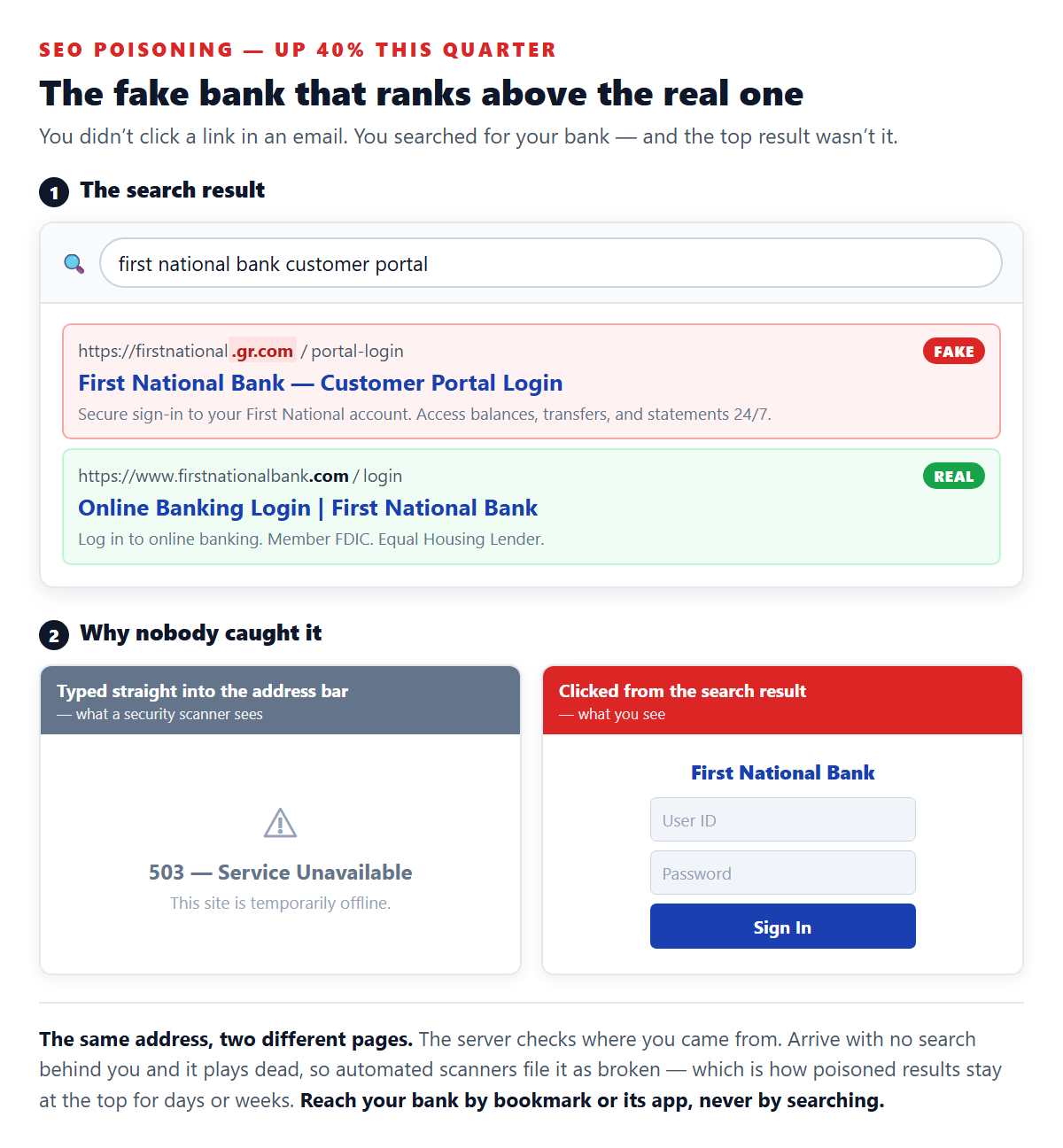
The setup is straightforward. Attackers register a domain that reads like a bank's — the reported campaigns favor odd second-level endings such as .gr.com and .ph.com, so a domain can end in something that looks almost like .com while being nothing of the sort. Then they do ordinary search engine optimization against high-intent phrases: "[Bank] customer portal," "[Bank] credit card login." Not the bank's brand name alone — the specific thing someone types when they are already reaching for their password.
Rank above the real bank for that phrase, and you don't need an email, a text, or a QR code. The victim comes to you, on purpose, having done what everyone told them to do.
The part that makes it work
Plenty of people have tried ranking fake login pages before. What's new is how these sites survive.
The server checks where each visitor came from. Arrive by clicking a search result, and it serves a polished, working copy of the bank's login page. Arrive any other way — typed directly into the address bar, which is precisely how an automated security scanner checks a suspicious URL — and it serves an offline page. A 503. Nothing to see.
So the scanner files the domain as broken. The takedown request never gets filed. The poisoned result sits at the top of the page for days or weeks.
Who this actually catches
Not the careless. This one is built for people doing their banking deliberately: reaching for a login page, at a keyboard, with intent. The last three scams we've covered all needed you to be interrupted — an email, a text, a message arriving out of nowhere. This one waits for you to come looking.
They are counting on you to let your guard down while you are doing the right thing. That makes this unusually effective against people who were taught to be careful about links and never taught to be careful about search results. Which, at the two Wisconsin senior centers we visited last week, was essentially everybody — and honestly, most of us.
What to do this week
- Bookmark your bank, once. Log in the way you normally do, then bookmark that page. From then on, use the bookmark. This is the single change that defeats the entire scheme, and you only have to make it once.
- Or use the bank's app. An installed app can't be outranked in a search result, because there is no search result.
- Read the ending of the domain, not the beginning. Anyone can put a bank's name at the front. The part that decides where you actually are is the last piece before the first single slash — and
.gr.comis not.com. - Treat a top search result like an ad, not an endorsement. Ranking first means someone was good at ranking first. It has never meant legitimate.
Where SAFE Portal fits
The domain check is the whole ballgame here, and it's what SAFE Portal does. Link screening flags a lookalike domain before the page loads, and the password manager compares where a page actually lives against where your credential belongs — so a pixel-perfect fake bank login simply stays empty. It cannot be fooled by a convincing design, because it never looks at the design.
One-click logins go further in a way that's specific to this scam: they take you to the real address directly, from your own dashboard. That is the "use a bookmark, not a search" advice the researchers recommend, except you don't have to remember to follow it.
What it won't do
SAFE Portal can't clean up a search engine's results, get a poisoned page taken down, or stop a fake site from ranking. That's on Big Search Engine and the registrars, and by the researchers' own account it's currently taking days to weeks. We also can't help if you type your password into a fake page by hand, from memory, on a device with nothing installed.
What software can do is make "is this really my bank?" a question you don't have to answer correctly every single time. Get it at SAFEPortal.to — free to try, about two minutes to set up.